AI family assistant

An AI family assistant that handles the household admin for you

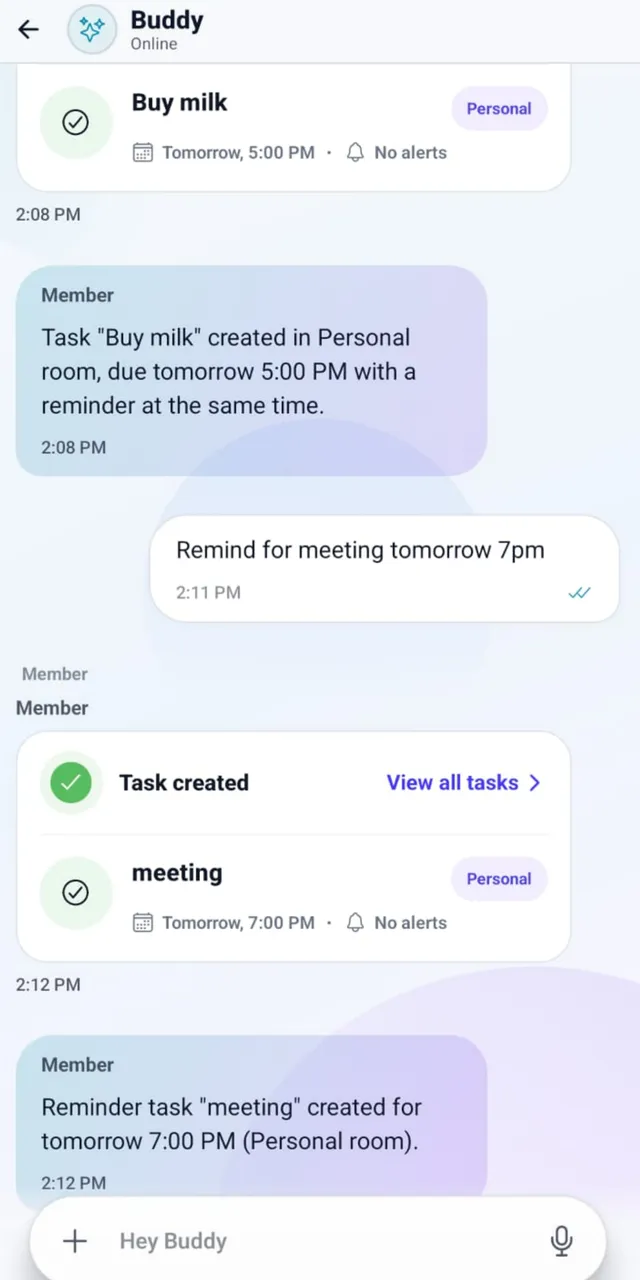
Tell it what needs to happen, by voice or chat. Home Run creates the events, lists, meal plans, chores and reminders, assigns the right people and keeps everyone updated.

Home Run chat turning a message into a task with a due date and reminder

What is an AI family assistant?

An AI family assistant is an app that organizes household life from plain-language requests. Instead of filling in a calendar, a grocery list and a chore chart by hand, you say what needs to happen. The assistant creates the entries, connects them, assigns the right people and reminds them, so the plan no longer lives in one person's head.

Most family organizers are digital versions of the fridge calendar: useful, but someone still has to type everything in and chase everyone up. An assistant takes over that typing and chasing. It is the difference between keeping a list and having someone keep it for you.

What an AI family assistant can do

Real requests and what Home Run does with each one.

  • Calendar

    "Add Mia's dentist appointment on Thursday at 4 and remind Raj the day before."

    The event goes on the shared family calendar, Raj is set as the person going, and he gets a reminder on Wednesday.

  • Meals and groceries

    "Plan easy dinners for this week. Mia doesn't eat mushrooms."

    A week of dinners that fits the family's preferences, with the missing ingredients added to one shared grocery list.

  • Chores

    "Aarav takes the bins out every Tuesday and Friday."

    A repeating chore assigned to Aarav, with a reminder each time it is due and a shared view of what is done.

  • School

    "The science fair project is due on the 18th. Remind us a week before."

    A school task with the due date, the right child, and a reminder in time to buy materials.

  • Documents

    "Where is Aarav's passport and when does it expire?"

    Home Run finds the saved document and the expiry date, and can remind you before renewal is due.

  • Expenses

    "Split tonight's dinner bill between Raj and me."

    The expense is recorded and split, and each person's balance shows who owes whom.

AI family assistant vs. a regular family organizer

Both keep the family's plans in one place. The difference is who does the work of keeping them up to date.

How an AI family assistant differs from a regular family organizer app
AreaRegular family organizerAI family assistant
Adding plansSomeone types each event, list item and task by handSay it once by voice or chat and the entries are created for you
Connected detailsCalendar, lists and chores live in separate placesOne request can update the calendar, grocery list and tasks together
Who is responsibleUsually whoever set it up remembersEach item has an owner, and the right person is reminded
Follow-upOne person checks and chasesReminders and summaries do the chasing
Staying currentOnly as up to date as the last person who typedEasy to update with a quick message, so it stays current

What to look for in an AI family assistant

Six questions to ask before your family starts using one.

  1. It is shared with the whole household. A family assistant should be used by partners, kids, grandparents and helpers, not just the person who downloads it.
  2. It acts, not just answers. Look for an assistant that creates the event, list item or chore and assigns it, rather than only giving advice.
  3. It works on everyone's phone. Mixed iPhone and Android families need one plan everyone can see.
  4. People see only what applies to them. Helpers and relatives should be able to join just the parts of family life they help with.
  5. It is clear about privacy. Check whether family data is sold, shared with advertisers or used to train AI models.
  6. You stay in control. You should be able to review, edit and delete what the assistant creates, and disconnect integrations at any time.

AI family assistants available today

Based on each company's public information as of October 2026. We make Home Run. For a wider comparison, see the best family organizer apps.

An app with a private family AI assistant built in

Home Run Our app

Turns voice or chat requests into calendar events, grocery lists, meal plans, chores, school tasks, reminders and expense splits, shared through rooms with the right family members and helpers.

See how Home Run works

An AI assistant you text

Ollie

Handles reminders, to-dos, meals, groceries and calendar conflicts through SMS, with no app to install. Plans are priced by message volume.

Read our notes on Ollie

AI on a wall calendar display

Skylight Sidekick

On Skylight's paid Plus plan, Sidekick turns forwarded emails, PDFs and photos of flyers into events and to-dos on the kitchen display.

Read our notes on Skylight

Personal assistants for one person

General AI chatbots

Chat assistants can answer questions and draft a meal plan or schedule, but they are built for one person rather than a shared household plan with owners, reminders and lists the whole family uses.

A private assistant for family information

Family schedules, children's details and documents are sensitive. Home Run is built around private household spaces.

  • Information is visible only to the household members and rooms you choose.

  • Home Run does not sell personal information or share family content with advertisers.

  • Google Calendar data is not used to train generalized AI models.

  • You can edit or delete content and disconnect integrations at any time.

Read how Home Run protects family data

FAQ

Questions about AI family assistants

What is an AI family assistant?

An AI family assistant is an app that organizes household life from plain-language requests. Instead of filling in a calendar, a grocery list and a chore chart by hand, you say what needs to happen and the assistant creates the events, lists, tasks and reminders, assigns the right people and keeps the family updated.

Can AI help manage household tasks?

Yes. An AI family assistant can turn a request such as "Aarav takes the bins out every Tuesday and Friday" into a repeating chore with an owner and reminders, so household tasks are tracked without one person remembering and chasing everything.

Can AI plan family meals and groceries?

Yes. With Home Run you can ask for a week of dinners that fits your family's preferences, and the missing ingredients are added to one shared grocery list. It can also suggest meals that use leftovers and pantry items first.

Is it safe to give an AI assistant family information?

It depends on the app, so check its privacy policy. Home Run keeps family information in private household spaces visible only to the members and rooms you choose, does not sell personal information, does not share family content with advertisers, and does not use Google Calendar data to train generalized AI models.

What is the best AI family assistant?

It depends on how your family works. Ollie suits families who want everything by text message, Skylight's Sidekick suits families with a wall display, and Home Run suits families who want one app where the assistant creates connected calendar events, lists, meal plans, chores and reminders for everyone, including helpers.

Is Home Run's AI family assistant free?

Home Run is free to download on the App Store and Google Play, with in-app purchases.

Want the step-by-step? See how Home Run works, from creating your family space to everyday requests.

iOS and Android

Make the home feel coordinated before anyone asks twice.

Download Home Run on iPhone or Android. Set up your private family space in minutes and invite the people who help run your home.